NEWS-360: google
Showing posts with label google. Show all posts

Thursday, July 18, 2019

how to create google survey forms

July 18, 2019 0
how to create google survey forms

how to create google survey forms,online forms,how to use google forms


Google Forms provide a fast way to create an online survey, with responses collected in an online spreadsheet. Create your survey and invite respondents by email. People answer your questions from almost any web browser - including mobile smartphone and tablet browsers. You view each response in a single row of a spreadsheet, with each question shown in a column. And Google Forms is free.

Forms

A Google Form is a great way to gather information related to meetings or conferences, for example. Before a meeting, collect the names and contact information for attendees. The day of a meeting, survey people to streamline your lunch order. After the meeting, use a survey to get feedback on conference sessions and gather suggestions for improvement.
However, Google Forms is not right for every situation. As of October 2012, Forms lacks "skip logic" found in some online survey tools. "Skip logic" lets you build an "if - then" sequence: if a person responds "yes", then ask question A, otherwise ask question B. IF you need skip logic, THEN a Google Form is not the right tool.
You can create a Google Form quickly: Google released a "one click" Chrome Web Store app to create a Google Form on October 23, 2013. The release coincided with the launch of several oneclick Chrome Web Store apps to create Docs, Sheets and Slides. Chrome browser users can install these apps from their respective links in the Web Store. (If you're a Chrome OS user, you can simply wait a bit. The links should appear as part of a system update.)

Figure A

how to create google survey forms

Create a simple survey form

To get started, let's assume you have four things: a Google account with Google Drive enabled, the Chrome browser, and the Google "one click" Forms web app installed. Follow the links to get each of these three items, if needed.

1. Click on the Forms web app icon


Monday, July 8, 2019

How to Publish An Application In The Play Store

July 08, 2019 0
How to Publish An Application In The Play Store
If you have been following my articles, you may have noticed that I have been writing about developing and publishing a Chrome extension. Now, I want to take you on a different journey. What one must undergo to publish an application in the Play store. Come on, let’s play.

Before We Get Too Excited

There are a few things we must check off before heading into the Play store:
  • Digitally Sign your APK - This is required by Google so that they can verify who the author of the application is.
  • Build Your APK - You need to build a release version of your application
  • Create A Developer Account - You need to have a developer account in the Google Play Console. While creating one is free, you do need to pay $25 in order to be able to publish applications.

Going Through The Motions

Now that we are done with all the formal stuff, we can start the process of publishing the application.
⚠️ Disclaimer : You will NOT be able to publish your application if you do not complete all the steps below
  1. Log in to the Google Play Console
  2. When you are on the All Applications tab, on the upper right corner you will see a Create Application button.

3. Next, give your application a title and the default language
4. You will now be moved to the Store listing screen


In here, you will need to provide the following mandatory things (they are mandatory because they have a ⭐ ️next to them):
  • A short description of your application
  • A full description
  • Screenshots (at least 2)
  • A Hi Resolution Icon
  • A Feature Graphic
  • The application’s type and its category
  • Your email
  • Your privacy policy (if you don’t have one, check the Not submitting a privacy policy checkbox)
5. Now go to the App Releases window
Here you will have to choose a track to release your application. A track is basically the release process of your application. You can either choose to release it straight to production, or a beta phase or for an internal test. Most tracks are similar in what you have to do, aside from the obvious differences, so I will focus on releasing an application to Production.
6. Here you will need to either sign your application using Google Play or you can opt out of it. Then, you will need to upload the APK you built.
Here you can also give the release a name and specify what is new in this release. Pay special attention to whatever you type in what is new in this release because it will appear in the Play store under the What’s New section. Once you are done, you can press the Review button on the lower right corner of the page.
7. Next up, Content Rating

After pressing the Continue button, which will not be grayed out if you did all the steps above, you will be asked several questions regarding the content of your application. Just follow them in order, filling one by one.
8. Last but not least, Pricing & distribution

In this last page, you can decide on:
  • If your application will be free or not
  • Which countries your application will be available to
  • If it contains ads
  • User programs
  • Consent
That’s it! After all this hard work, you can now publish your application. Head back to the App releases window and proceed to publishing your application.
hope you understand better 
if you have problem try to contact me on social media link are on up corner website just cheek  .
If you enjoy and problem solved then comment bellow 
thnaks  

SetupVPN - Lifetime Free VPN,Best VPN for Google Chorme,Setup VPN Free Download

July 08, 2019 0
SetupVPN - Lifetime Free VPN,Best VPN for Google Chorme,Setup VPN Free Download
Overview:-


Unblock any blocked website in your country, school or company. It's free and easy to use.
Bypass any website that has been blocked by your government, school or company with just single click. SetupVPN comes with UNLIMITED bandwidth and it is completely FREE for everyone! 

Secure your browser activity with military grade encryption while using public wifi hotspots, company network or school network. SetupVPN offers high degree Wi-Fi security and online privacy.

With over 100 servers spread all over the globe, SetupVPN lets you access any content that is not available in your country, company or at your school. Simply change your location, encrypt your connection and change your IP address.

No technical knowledge required. Simply download extension, create an account and DONE! Change your location against online trackers. Prevent websites from gathering your personal information.

SetupVPN easiest way to setup a VPN server!

SetupVPN comes with:
- UNLIMITED and 100% Free VPN server
- No bandwidth or speed limitations.
- 4096 bit military grade encryption

Additional Information:-
Version3.7.0UpdatedJune 11, 2019Size1.28MBLanguageEnglish (United States)
Developer
info@vpn1.comPrivacy Policy
815 Ponce De Leon Blvd, STE 209 CORAL GABLES, Florida 33134 United State

Saturday, June 22, 2019

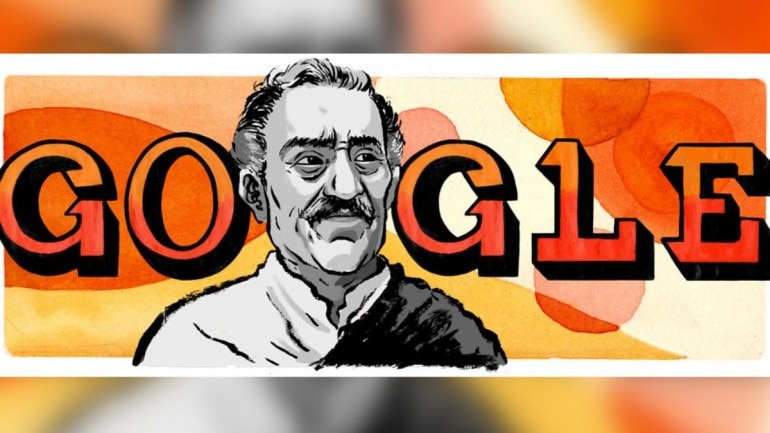
Google Doodle honours Bollywood's iconic actor Amrish Puri on his 87th birth anniversary

June 22, 2019 0
Google Doodle honours Bollywood's iconic actor Amrish Puri on his 87th birth anniversary

Google honoured renowned Bollywood actor Amrish Puri on his 87th birth anniversary today, on June 22, 2019, with a doodle, which celebrates the life and legacy of the actor.

Google honours Amrish Puri with a doodle
Google honoured renowned Bollywood actor Amrish Puri on his birth anniversary today, on June 22, 2019, with a doodle.
The doodle which was unveiled by Google on the actor’s 87th birthday, was made by a Pune-based guest artist Debangshu Moulik, and celebrates his life and legacy.
Amrish Puri, who is known for his iconic and some of the most memorable roles as a villain in innumerable movies in the Indian cinema, is best remembered for his role as Mogambo in Mr India.
His dialogue "Mogambo khush hua' went on to become his signature dialogue and is popular to this day.
Born in Punjab on this day in 1932, Puri landed his first role in a movie at the age of 39, before which he was working in the theater and doing voiceover parts.
He made his Bollywood debut in 1971 with the film Reshma Aur Shera. He made it big into Hollywood with his role in the Oscar-winning movie, Gandhi. He also acted in Steven Spielberg’s Indiana Jones and the Temple of Doom.
He worked in over 200 films and also acted in films from other languages like Kannada, Marathi, Punjabi, Malayalam, Telugu and Tamil as well.
Puri passed away on December 27, 2004 after suffering from myelodysplastic syndrome.

Friday, June 7, 2019

FIFA Women's World Cup 2019: Google kicks off the tournament with a doodle

June 07, 2019 0
FIFA Women's World Cup 2019: Google kicks off the tournament with a doodle

Google Doodle celebrated the eighth edition of FIFA Women's World Cup 2019 with a cartoon of women wearing different football jerseys and playing the game. The doodle is a part of an upcoming series that will be published by Google over the next month.

FIFA Women's World Cup 2019: news-360

Today marks the official opening of the 2019 FIFA Women’s World Cup and Google marked the day with an incredible doodle.
Celebrating the eighth edition of the tournament, the doodle had cartoon of women wearing different football jerseys and playing the game.
The doodle is a part of an upcoming series that will be published by Google over the next month during the tournament, and will be made by guest artists representing each of the competing countries.
The opening match will be between the host country France and South Korea at 12:30 am on Saturday in Parc des Princes in Paris. The French side is ranked 4th in the world and is tipped to go all the way in the mega event.
Followed by a match between Germany and China at 6:30 pm and Spain and South Africa at 9:30 pm.
This year 24 countries are taking part in the World Cup, which will played in nine cities in France, and will go on for a month.
This year four teams will be making their debut in the World Cup and they are Chile, Scotland, South Africa, and Jamaica; which is also the first Caribbean team to qualify in World Cup.

Monday, June 3, 2019

Top Ways to Increase AdSense CPC

June 03, 2019 1
Top Ways to Increase AdSense CPC
Before we discuss the top ways to increase AdSense CPC, let’s first define the term CPC or ‘Cost Per Click.’ If you are using Google AdSense on your web pages then you will know that these are adverts from Google’s AdWords advertising program. Advertisers using the AdWords program pay Google for every click made on their adverts.
Image result for cpc adsense

When you place AdSense blocks on your web pages and blogs, you get paid a percentage of what advertisers pay Google. Currently this is 68% of the bid price for that advert. So if somebody is paying Google $2 for every click on a specific advert for a specific keyword, then you get $1.36 every time a visitor to your site clicks on that advert if Google has placed it on your page.
What you have to do is to do your best to maximize the CPC price, so that the adverts on your web pages and blog posts make you most money every time a visitor clicks on them. This involves getting Google to place the highest possible value adverts on your pages. You cannot decide the PPC of the published ads yourself – Google decides that based on several aspects of your web page/blog page/blog post.
There are two factors involved here: the CPC and CTR (Click Through Rate) – the latter is the ratio of visitors who actually click on an advert rather than just read the page content and ignore the ads. A high CTR is often better than a high CPC.
Thus, if you get a CTR of 2% with adverts with a CPC of $0.75 (2 visitors in each 100 click on an advert), then that is better than a CTR of 1% with adverts with a CPC of $1.20. With the former, each 1,000 visits will make you $10.20 (68% of $15) while with the latter you would make only $8.16. So CTR matters, not just earnings per click. It’s how many that click that often makes your money, not always the cost of each click.
These are examples only, and your income per 1,000 visitors will depend upon the relevance of the AdSense ads to your visitors and where the adverts are situated on your site. There is also a lot you can do to improve CTR, but let’s first focus on how you can attract the best paying adverts: those with the highest CPC.

1. Get Quality Traffic

This is out #1 Tip on how to increase AdSense CPC. Many leave it till last or do not even mention it at all. It is my view that if your visitors are not properly focused on your niche, then they will not click on adverts appertaining to it. You must make sure that your traffic is seeking what you are advertising.

Many people use AdSense on their sites in the assumption that Google will provide relevant advertising. As you will learn shortly, this is true. However, while you might believe wrongly that your CPC will not change because of a failure to achieve this relevancy to your page, your CTR certainly will. Few will click on an advert not related to the keyword or phrase they used to get to your site.
Google uses many metrics when deciding what web pages get the top paying clicks, and one of these is almost certain to be your CTR for the ads they provide. The higher the CTR for a URL, then the higher CPC you are likely to get when your AdSense ads are refreshed on that page URL.
Google’s AdSense customers are the advertisers, and the company will do whatever it can to make sure that these paying advertisers get good value for money – or a good conversion rate from clicks. If you do not attract visitors to a web page or blog post that have a strong interest in the topic of the page or post, then your CTR might be low. Read our publication to increase your blog traffic.

Not only that, but some of these visitors might click on ads just to see what they are – with no intention of buying. Google’s TOS are very strict with AdSense, and you could find your account being cancelled for life if you get too many clicks on your site that never lead to a sale.

It is extremely important for your web page to be relevant to a specific keyword for you to receive ads targeting that keyword, and also important that your visitors have a strong enough interest in that topic for them to click on the advert with a serious view to purchasing a product.
Otherwise, Google has its own way of analyzing the performance of your site, and you may experience a reduction in the higher CPC advertising on your pages. So make sure that traffic coming to your blog or website is following links or direct advertising that promote your specific niche.

2. Do Your Research


The second tip on how to increase AdSense CPC is equally important. You must research your niche for the highest paying keywords. The way AdWords operates is that advertisers bid for keywords. The more they pay-per-click for a specific keyword, the higher in the Google SERPS their advert will appear. The niche is irrelevant – what is relevant is what each advertiser is willing to bid to get the #1 or even a Page #1 position for their advert on Google SERPS for that keyword.

Take What You Get: As stated earlier, you cannot choose what AdWords ads you want to appear in your AdSense blocks. Google decides that according to the relevance of your page to the keyword. You may be given adverts appearing on Page #1 of the SERPS or on page 20. The advert on Page #1 obvious costs a lot more per click than that on page 20 – so your 68% share is likewise larger.
Keyword Selection: That means you must also figure out what keywords you should use for the pages containing AdSense and the semantics you use on the page. Google uses an algorithm very similar to its LSI algorithm to establish the meaning of your page. The ads it places on that page or blog post will relate to the Google algorithm’s view of the content of that page. If you wish to target high-priced keywords, then select one and design the whole page around that.
AdSense SEO Basics: Your Title tag and Meta description should include the targeted keyword, as should the H1 header and at least one H2 heading. The vocabulary you use in your page content should relate semantically to the target keyword, and your image ‘alt’ attributes should also contain it. Where AdSense is concerned, classical SEO techniques definitely help to ensure you get the highest CPC ads included on the page.
Do your research, and establish the keywords targeted by the higher paying adverts – highest AdSense CPC. Optimize your web pages or blog posts for these keywords if you want to be given the highest CPC adverts for them. However, the content of your entire domain also matters.

3. The Entire Domain Counts

Google is not stupid, and will take the theme of your entire domain into account. You cannot publish pages on a wide variety of topics and expect to receive relevant ads on each. Google will look at the authority of your entire site and its relevance to the top-paying keywords. An authority site may be rewarded with the higher priced keywords because Google looks after its advertisers.
If your site is not regarded as being focused on a specific keyword, then you may be given the lower priced keywords – based upon the content of that one page rather than the overall authority of your website or blog in relation to the main target keyword.
So be realistic with your expectations of AdSense income, because Google will not award you the highest CPC adverts unless it is sure that your blog will offer its customers a good service that attracts high-quality clicks from visitors genuinely interested in the product or service they are advertising. One way to persuade Google to increase your average CPC is to persuade its algorithms that your domain is an authority on the specific keyword you target.

4. Balance Ad Blocks Numbers with Content Length

You are allowed three AdSense blocks on your page. However, do not use all three unless your content or blog posts are long enough to warrant it. Keep in mind what you have read above: Google apportions ads according to your content!
If your content is insufficient to give the Google algorithm enough information for your three ad blocks, then you may find your page containing irrelevant Adverts and even some public ads! These are general adverts irrelevant to your niche, and they will drastically reduce your average CPC. Many people get better results with just one ad block on short content pages, because all the ads will more focused on their topic and of a higher average CPC that if 2 or more blocks were published.

5. Analyze Your Ad Placement

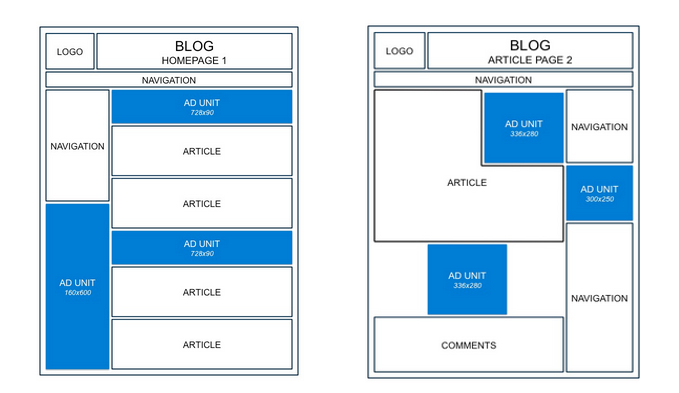
You can place ads right at the top of your page, in the middle, at the bottom as a footer on every page or anywhere else you want. Google usually offers you the highest paid ads it is prepared to give you to the first slot loaded. Are you aware of the loading order of each element on your blog or website page? If not, check your source code (Ctrl+U) or concern with your theme developer.
The first AdSense block that appears in the source file will be the first that Google finds. That block will usually be given the highest CPC adverts, with lower CPC ads being provided in those blocks loading later.
Ads Placement

Split Testing of AdSense Ads

It will be worthwhile carrying out split testing to establish the best approach to increasing your AdSense CPC. Run a few days with only one ad block and a few days with two. Theoretically, your CPC should be better with just the one because that should be filled with higher-paying ads. Other split tests:
  • A single header advert vs. a block of 4.
  • A video ad vs. a text ad
  • A single ad at the end of a post vs. a single ad at the beginning.
  • Compare various placement locations
  • Use channels (see next Tip)
If you find internal ads performing well in spite of you using a header ad, then that tells you that readers are going deeper into your blog before clicking on adverts. Many people will avoid clicking header ads because these take them away from the information they are seeking. Once they have read your blog post, they might be open to clicking on adverts.
In this case, one or two AdSense ads at the bottom of a page, or end of a post, might perform better than those at the beginning. Keeping in mind that Google will likely provide the highest CPC AdSense to the first ads published on your page, then you might make more by using just one ad block in a position where testing has indicated you are likely to get most clicks.
So how do you establish which ad blocks are performing best?

6. Use AdSense Channels to Increase AdSense CPC

You can set up your tests using AdSense channels. You can create custom channels to establish the CPC and CTR of individual ad blocks. Measure the performance of each channel over a period of 2-4 weeks and then design your AdSense strategy on the results. Channels can be created for individual adverts or ad blocks.
This enables you to delete any low-performing blocks, or to change their position on your page. Google may provide the highest-paying AdSense adverts to those adverts that perform best. That is because these advertisers are paying for maximum exposure. A top bid for a specific keyword not only get you top of Page#1 of Google SERPS for that keyword, but also exposure on the top performing ad blocks on the top performing web pages.
Custom channels enable you to establish the CTR and CPC of each of your individual ad blocks or even individual adverts. You can establish whether a single banner advert pays more than the combined income from each advert in a 4-ad block in the same position on your page. You can also set up channels to compare advert sizes.

7. Text, Image and Video AdSense Adverts

During your testing and custom channel analysis keep in mind that some people prefer text ads to image ads, and some prefer video ads. Many expect AdSense ads to be text links, and deliberately avoid them. They might, however, click on an image and even more might click to watch an interesting video. Google classes videos as image ads – you get a click recorded when a video is clicked to ‘Play’. The entire video need not be played – just that initial click on the play button.
Always keep in mind that you don’t have to bother about what your visitors do after they make the click, because that’s all you get paid for. Attracting that click! It doesn’t matter if the video is of poor quality – or even if it fails to run! You get paid for the click! With AdSense, your task is to persuade visitors to click. When seeking ways to increase AdSense CPC, you job is to increase the price for that click.
Video adverts can get clicks even just for the interest value – many people will watch a video who wouldn’t dream of clicking a text ad. This is why it is so important to test the various advertising formats that AdSense offers. Channels might be the most appropriate method for you, although some have their own ways of doing this – generally by publishing optional ads for a short period of time each and comparing results.

8. Why Google Recommends Image and Video Ads

You can only show one image or video advert at a time – you cannot display a row of image ads as you can text ads. This focuses your visitor’s attention on one advert. The more popular advertisers, manufacturers and service providers like to promote their brand. This means a logo or some other image that they include in their AdSense advertising.
It also means that they are more likely to create videos to promote their businesses. Such adverts tend to pay more per click than simple text ads – but only if the video content matches well with the content of your page.

9. Improving Your AdSense CTR for Higher Online Income

We have explained that your AdSense Click Through Rate (CTR) is the percentage of visitors to your page that click on an AdSense advert. So, if you have 20,000 visitors each month, and you get 40 clicks on AdSense ads, your CTR is 0.2% if you get 500 clicks on ads, your CTR is 2.5%. Irrespective of the CPC, you want your CTR to be as high as possible.
We provided some income examples at the beginning of this blog post, and here are some more. If the average CPC paid by Google to you is 40c, then the above examples would give you a monthly income of $16 and $200. If you can increase your CPC to 80c, then you earn $32 to $400 each month. The greater your CTR the better for you – you have more control over this with ad placement than you have over CPC!
Some people make thousands every month using AdSense on multiple sites. However, even with one blog, you have no reason not to maximize your income by using some basic common sense: place your AdSense ads on those areas of your website or blog on which people tend to spend most time.

10. Using Heat Maps

This information is available on what are known as ‘heat maps’ – representations of a web page showing where most people tend to spend most of their time and also click the most. By placing your individual AdSense advert or your ad block in the most popular areas of your site, then you should get most clicks – a higher CTR, and hence more income!
Check out our Heat Map Post for more information on how to use them to increase AdSense CPC and CTR on any website or blog. To be truthful, the positioning will only affect your CPC if Google’s crawlers believe the position of the ad to be important (e.g. as a header or close to the top of the page as ‘seen by Google’). It might affect the CTR, although refer to Para 5 above).

The heat map gives you an indication of where people hover most on your page, and more advanced versions can indicate where they also clicked. In the example shown by the above link, you will see most activity was on the navigation links, the newsletter and the content heading. Would these same visitors have clicked on adverts – you don’t know, but you can find out by using heatmap software of your own. A good version is ClickTale – you can try it out free.

Popular Posts